Making Tax Digital for Income Tax: A Guide for the Self-Employed and Landlords
By the PRS Smart Accountants team · Updated November 2026 · 12-minute read
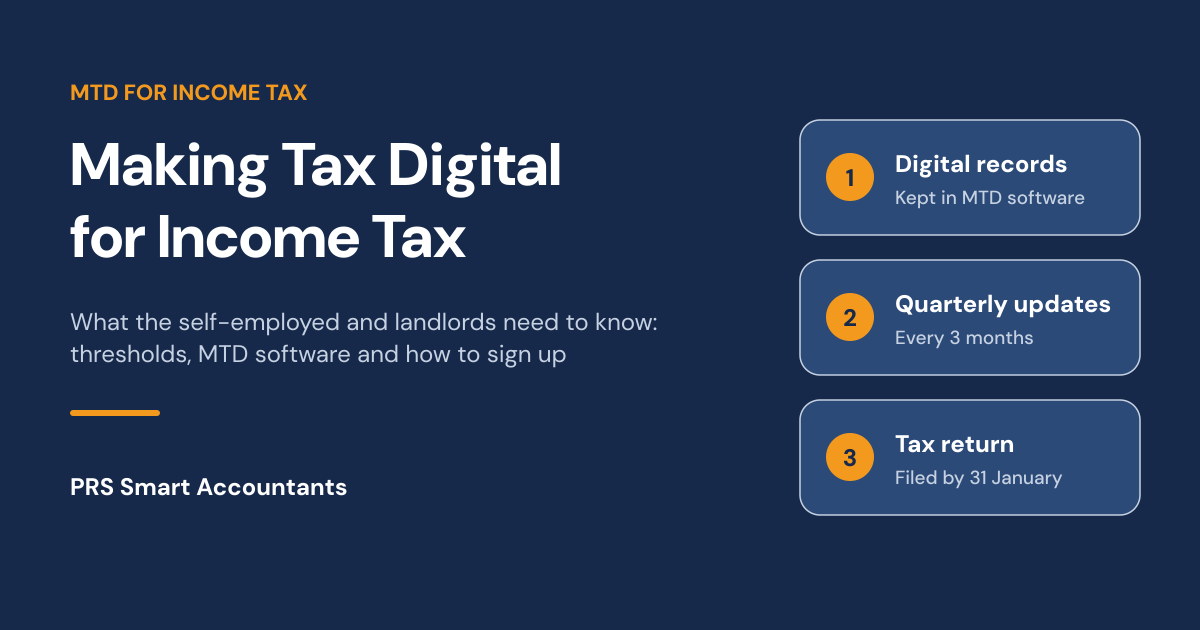
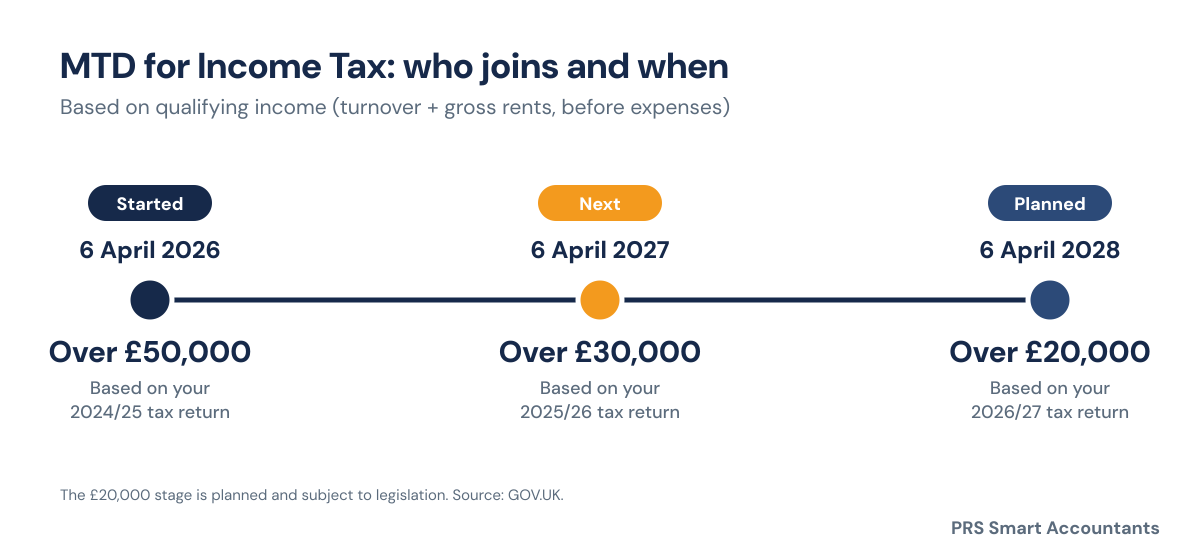
Making Tax Digital is the biggest change to how sole traders and landlords report their income since Self Assessment began. Since 6 April 2026, Making Tax Digital for Income Tax has been mandatory for anyone whose self-employment and property income was over £50,000. From April 2027, it reaches everyone over £30,000, and the government plans to bring in people over £20,000 from April 2028.
This guide explains everything you need to know about Making Tax Digital for the self-employed and landlords. It covers who has to join MTD for Income Tax and when, what changes day to day, how to choose MTD software, and exactly how to complete your MTD sign up and register for Making Tax Digital on GOV.UK. At PRS Smart Accountants, our Self Assessment and MTD accountants help sole traders and landlords get ready, sign up and send every quarterly update on time.
Quick answer: Making Tax Digital for Income Tax means keeping digital records in HMRC-recognised MTD software, sending HMRC a summary of your income and expenses every quarter, and filing your tax return through the same software by 31 January. If your qualifying income for 2025/26 is over £30,000, you must use it from 6 April 2027, so the time to choose software and complete your MTD sign up is now.
What is Making Tax Digital for Income Tax?
Making Tax Digital (MTD) is HMRC's programme to move tax reporting online. It started with VAT: every VAT-registered business must now keep digital records and file through MTD-compatible software. Making Tax Digital for Income Tax (often shortened to MTD for Income Tax or MTD for ITSA) applies the same idea to sole traders and landlords who file a Self Assessment tax return.
Under MTD for Income Tax, you must:
- keep digital records of your self-employment and property income and expenses
- send HMRC a quarterly update every three months using MTD software
- submit your tax return through the same software by 31 January after the tax year ends
HMRC's overview of Making Tax Digital for Income Tax and its step-by-step guide for sole traders and landlords set out the full rules.
Who needs to use Making Tax Digital for Income Tax?
You need to use MTD for Income Tax if you're an individual registered for Self Assessment, you get income from self-employment, property or both, and your qualifying income is over the threshold. Qualifying income is your total income from self-employment and property before expenses (your turnover or gross rents), not your profit. Employment income, pensions, dividends and savings interest don't count towards it. HMRC explains how to work out your qualifying income.
For example, a sole trader with £25,000 of turnover who also receives £8,000 a year in rent has qualifying income of £33,000. That's over £30,000, so they must join Making Tax Digital for Income Tax from April 2027, even though their taxable profit may be far lower.
MTD for Income Tax timeline: 2026, 2027 and 2028
HMRC uses the tax return you filed for an earlier year to decide when you must start:
| Qualifying income | Based on your tax return for | You must use MTD for Income Tax from |
|---|---|---|
| Over £50,000 | 2024/25 | 6 April 2026 |
| Over £30,000 | 2025/26 | 6 April 2027 |
| Over £20,000 (planned) | 2026/27 | 6 April 2028 |
The £20,000 stage is still subject to legislation, as GOV.UK's check when to sign up page notes. If your income is above a threshold, HMRC will write to you, but you're still responsible for signing up even if a letter doesn't arrive.
How the first year of MTD for Income Tax has gone
HMRC estimated that around 864,000 sole traders and landlords were in the first wave from April 2026. By August 2026, more than 570,000 had signed up and over 436,000 had sent their first quarterly update. Since September 2026, HMRC has been signing people up itself where they should be using MTD but haven't joined. HMRC is now urging sole traders and landlords earning more than £30,000 to act early, ahead of April 2027.
Making Tax Digital for the self-employed and landlords: what changes
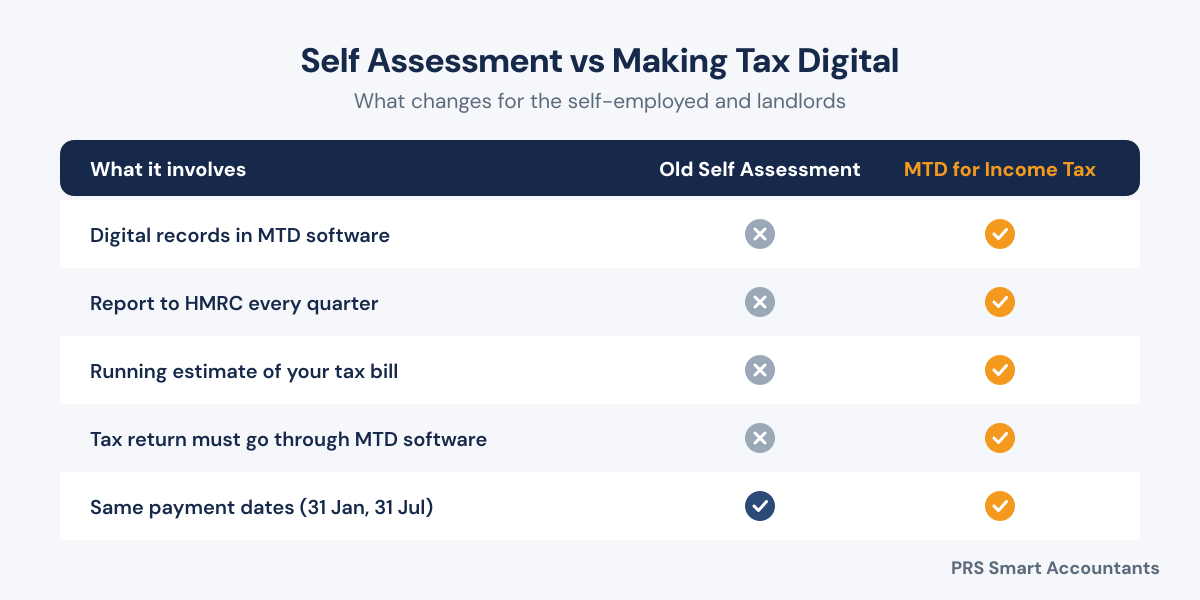
Making Tax Digital for the self-employed doesn't change how much tax you pay or when you pay it. Balancing payments and payments on account are still due on 31 January and 31 July. What changes is how you keep records and how often you report to HMRC.
1. Digital record keeping
Every sale, invoice, rent receipt and business expense must be recorded digitally in MTD software, or in spreadsheets linked to bridging software. You can still keep paper receipts, but the record of each transaction must be digital. Good habits here make everything else easier. See our guides to preparing business records for a smoother tax return and organising rental income records.
2. Quarterly updates
Every three months you send HMRC a summary of your income and expenses through your software. It isn't a tax return, just a progress report, and each update is cumulative, so you can correct earlier figures in the next one. If you have more than one income source, you send an update for each: a sole trader who is also a landlord sends two updates each quarter. All your UK properties count as one UK property business.
Here are the quarterly update deadlines if you use standard update periods:
| Quarter | Period covered | Quarterly update due |
|---|---|---|
| Q1 | 6 April to 5 July | 7 August |
| Q2 | 6 July to 5 October | 7 November |
| Q3 | 6 October to 5 January | 7 February |
| Q4 | 6 January to 5 April | 7 May |
| Tax return | The whole tax year | 31 January following |
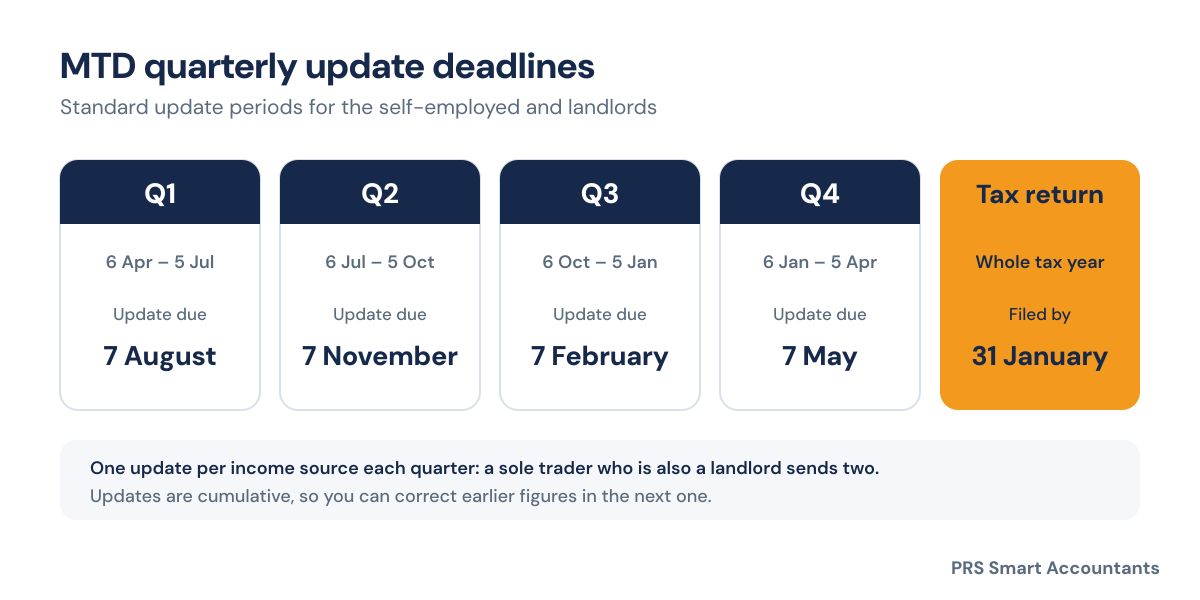
You can choose calendar update periods instead (quarters ending 30 June, 30 September, 31 December and 31 March). The deadlines stay the same. For a closer look at the quarterly cycle, read our MTD for Income Tax quarterly updates guide.
3. Your tax return goes through your MTD software
After the year ends, you add any other income (such as employment, savings or dividends), make your adjustments and claims, and submit your tax return through your MTD software by 31 January. Once you're in MTD for Income Tax, you can no longer file using HMRC's old online return or a paper return. The 31 January deadline still matters, as our guide to missing the Self Assessment deadline explains.
4. New penalties under Making Tax Digital for Income Tax
MTD for Income Tax comes with a new points-based penalty system:
- Late submission: each missed quarterly update or tax return deadline earns one penalty point. At 4 points you pay a £200 penalty, and another £200 for each further missed deadline. These points are separate from any VAT penalty points.
- First-year soft landing: there are no penalty points for late quarterly updates in your first year. This covers people who joined in April 2026 and, following the October 2026 Budget, people joining in April 2027. A late tax return still earns a point, and you must send every quarterly update before you can file your return.
- Late payment: for 2026/27 there's no penalty if you pay within 15 days. After that, it's 3% of the tax owed at day 15, another 3% of what's still owed at day 30, then a daily penalty at 10% a year. In your first year you get 30 days before a penalty applies. Rates for later years are set out on GOV.UK.
Benefits of Making Tax Digital for the self-employed
It's a change, but MTD for Income Tax has real advantages:
- a running estimate of your tax bill, so there are no surprises in January
- fewer errors, because figures flow straight from your records
- a clearer view of your cash flow and profit through the year
- no last-minute scramble to find a year's worth of receipts
Our self-employed tax playbook shows how to use that visibility to claim every allowable expense. Landlords should also read about the landlord tax rises coming in April 2027.
MTD software: how to choose the right one
HMRC doesn't provide free MTD software of its own, so you'll need a commercial product that works with Making Tax Digital for Income Tax. Choosing the right MTD software is one of the most important decisions you'll make, because you'll use it every quarter for years.
Types of MTD software
GOV.UK's guide to choosing the right software describes two main types:
- All-in-one accounting software: creates your digital records, sends quarterly updates and files your tax return. Popular options include Xero, QuickBooks, Sage and FreeAgent. Bank feeds pull in transactions automatically, which saves hours.
- Bridging software: connects your existing spreadsheets to HMRC. This suits people who are happy with spreadsheets, but the links must be digital: copying and pasting figures by hand doesn't meet the rules.
You can search HMRC's official MTD software finder to see which products are recognised and which income types each one supports.
MTD software checklist
Before you choose, check that the software:
- supports all your MTD income sources: self-employment, UK property and foreign property
- can file your full tax return, including other income such as employment, dividends, savings, pensions or CIS deductions
- connects to your bank for automatic bank feeds
- handles VAT too, if you're VAT registered, so you only need one system
- lets your accountant log in and send updates for you
- shows a running estimate of your tax bill
- has a price you're comfortable paying every year
The Low Incomes Tax Reform Group has more independent advice on choosing MTD software.
Moving to cloud accounting
If you still use paper records or an old desktop package, now is the time to move. PRS Smart Accountants can set up and migrate your cloud accounting, including a full conversion to Xero. We'll set up your bank feeds, chart of accounts and income sources so your MTD software is ready for your first quarterly update. Our Xero bank reconciliation guide shows how to keep your records MTD-ready each month.
MTD sign up: how to register for Making Tax Digital
If you'll need MTD for Income Tax from April 2027, you should register for Making Tax Digital before 6 April 2027. Signing up early gives you time to choose MTD software and check that HMRC has the right details. If you wait, HMRC may sign you up itself, and you'll still have to check and correct what it holds.
What you need before your MTD sign up
- Self Assessment registration: you must be registered for Self Assessment and have filed a tax return in the last two years. If you've just started trading or letting, register for Self Assessment first.
- Your Self Assessment login: the user ID and password you use for your online tax account.
- Business details: your trading name, business address and type of trade, plus the start date of any business or letting that began in the last two tax years.
- Identity documents: you may need to prove your identity using a mobile app and your passport or driving licence.
- MTD software: you'll connect it once you've signed up.
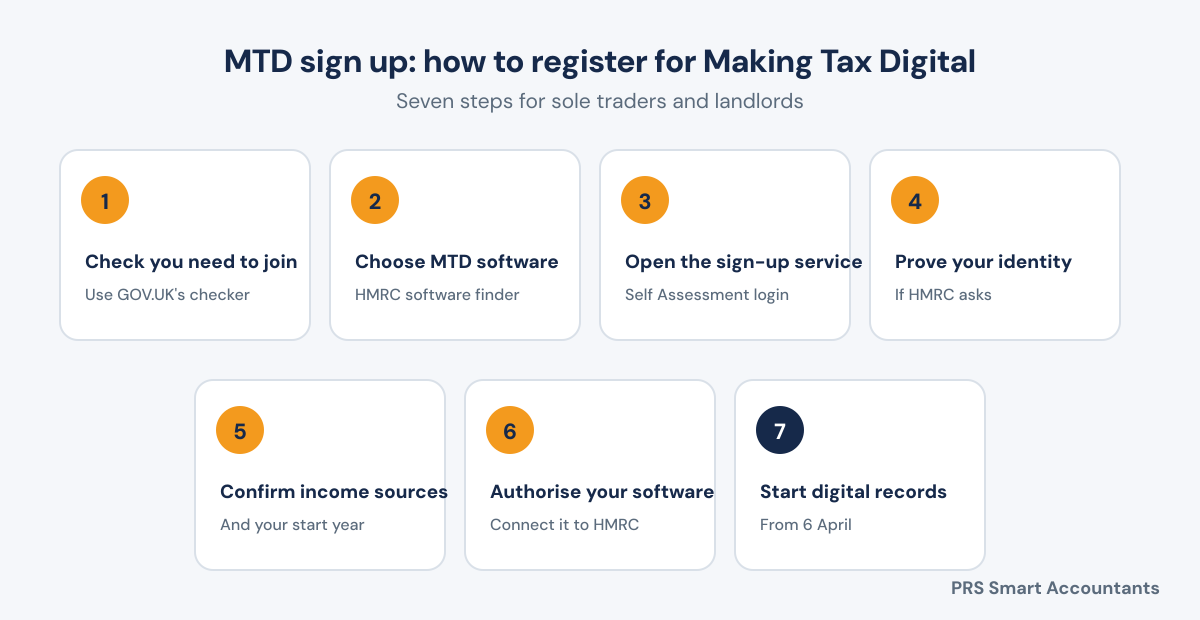
How to register for Making Tax Digital, step by step
- Check you need to join. Use GOV.UK's tool to find out if and when you need to use Making Tax Digital for Income Tax.
- Choose your MTD software. Pick a product from HMRC's software finder that supports all your income sources.
- Go to the sign-up service. Open HMRC's Making Tax Digital for Income Tax sign-up service and sign in with your Self Assessment user ID and password.
- Prove your identity if HMRC asks.
- Confirm your income sources. Check each self-employment and property business, add any that are missing, and choose the tax year you'll start.
- Authorise your software. In your MTD software, choose the option to connect to HMRC and sign in with the same details.
- Start your digital records from 6 April, or from 1 April if you use calendar update periods.
GOV.UK's full guide to signing up for Making Tax Digital for Income Tax has more detail. If you use an accountant, they can complete your MTD sign up for you, but each client still has to be signed up separately.
Signing up voluntarily
You can register for Making Tax Digital before you're required to. Many people in the £30,000 group are joining early to get used to quarterly updates while the stakes are low. If you join partway through a tax year, you must catch up on digital records and any missed quarterly updates for that year.
Can you be exempt from Making Tax Digital?
Some people don't need to use MTD for Income Tax. You may be able to apply for an exemption if you're digitally excluded, meaning it isn't reasonable for you to use software because of your age, a disability, where you live (for example, no reliable internet) or another reason. HMRC decides case by case. It won't accept that you're digitally excluded just because you used to file on paper or aren't familiar with accounting software. Check GOV.UK's MTD exemption guidance, and apply before the tax year in which you'd otherwise have to start.
How PRS Smart Accountants helps with Making Tax Digital for Income Tax
Making Tax Digital for Income Tax adds four deadlines a year to your diary. PRS Smart Accountants takes that work off your hands, so you stay compliant without spending your evenings on admin.
Our MTD for Income Tax service
- MTD readiness check: we work out your qualifying income and confirm when you need to join.
- MTD sign up: we register you for Making Tax Digital as your agent and check your income sources are correct.
- Software setup: we help you choose MTD software and set it up with bank feeds and the right categories.
- Digital bookkeeping: our bookkeeping team keeps your records up to date every month. If you're behind, our catch-up service brings them up to date first.
- Quarterly updates: we review and send every quarterly update before the deadline.
- Year-end tax return: we finalise your figures, claim the reliefs you're entitled to and file your return through your MTD software.
- Tax planning: our tax advisory team uses your quarterly figures to plan ahead and reduce your bill.
Support for sole traders, freelancers and landlords
- Self-employed and freelancers: see our Self Assessment tax return service and our freelancer tax filing checklist.
- Landlords: our specialist landlord accountants handle MTD quarterly filing, Section 24 and portfolio records. We also offer rental business accounting.
- Construction subcontractors: we combine MTD with CIS returns and refunds.
- VAT-registered businesses: we can run your VAT returns and Making Tax Digital for Income Tax in one system.
Our QuickBooks and Xero certified team works to a documented, ISO 27001-secure process. Part-time support starts from £500 for 40 hours a month. See our pricing, or read why clients choose PRS.
Frequently asked questions about Making Tax Digital
What is Making Tax Digital for Income Tax?
Making Tax Digital for Income Tax is HMRC's new way for sole traders and landlords to report income. You keep digital records in MTD software, send quarterly updates of your income and expenses, and file your tax return through the same software by 31 January.
When does Making Tax Digital for the self-employed start?
It started on 6 April 2026 for sole traders and landlords with qualifying income over £50,000. It extends to those over £30,000 from 6 April 2027, and the government plans to bring in those over £20,000 from 6 April 2028.
Is the MTD threshold based on turnover or profit?
Turnover. Qualifying income is your total self-employment turnover plus gross property income, before expenses. Wages, pensions, dividends and savings interest don't count.
How do I register for Making Tax Digital?
Check whether you need to join, choose MTD software, then use HMRC's online sign-up service with your Self Assessment user ID and password. Confirm your income sources and start year, then connect your software to HMRC. An accountant can complete your MTD sign up for you.
Is there free MTD software?
HMRC doesn't provide its own MTD software. Some providers offer free or low-cost products for simple cases, and you can search HMRC's software finder to compare what's available.
What happens if I miss a quarterly update?
Outside your first year, each missed deadline earns one penalty point, and four points trigger a £200 penalty. In your first year there are no points for late quarterly updates, but you still have to send them all before you can file your tax return.
Further reading
Guides from PRS Smart Accountants
- MTD for Income Tax: self-employed quarterly updates guide
- What happens if you miss the 31 January Self Assessment deadline?
- Landlord tax April 2027: new rates explained
- UK landlord compliance checklist for 2026
- How UK landlords can organise rental income records
- Freelancer Self Assessment tax filing checklist
- The self-employed tax playbook
- MTD-ready Xero bank reconciliation in 7 steps
- Cheapest small business tax consultants in the UK
- Browse more tax guides, our FAQs or our free guides and tax dates
Official guidance
- GOV.UK: Making Tax Digital for Income Tax
- GOV.UK: Sign up for Making Tax Digital for Income Tax
- GOV.UK: Find MTD software
- GOV.UK: Penalties for Making Tax Digital for Income Tax
- ICAEW: Making Tax Digital hub
- ATT: How the MTD income exemption works
Get ready for Making Tax Digital with PRS Smart
Making Tax Digital for Income Tax is here to stay, and the next group of sole traders and landlords joins in April 2027. Whether you need help with your MTD sign up, choosing MTD software or sending quarterly updates, PRS Smart Accountants can do it for you, accurately and on time.
Book a free MTD consultation with PRS Smart Accountants and get ready for Making Tax Digital with confidence.
This article is general information, not professional tax advice. MTD rules, thresholds and penalties are correct as of November 2026 and may change.
Sources
- GOV.UK: Check when to sign up for Making Tax Digital for Income Tax
- GOV.UK: Sign up for Making Tax Digital for Income Tax
- GOV.UK: Penalties for Making Tax Digital for Income Tax
- GOV.UK: 436,000 sole traders and landlords make their tax digital
- GOV.UK: Find out if you can get an exemption
- ICAEW: Budget – MTD penalty soft landing and exclusions (October 2026)
- ICAEW: MTD and income tax
- LITRG: Choosing Making Tax Digital software
More on uk & international tax
Browse our uk & international tax guides or discuss your circumstances with our tax advisory team.
- How to prepare your business for UK tax deadlines: a practical checklist
Stay compliant with UK tax deadlines—Self Assessment (Jan 31), Corporation Tax, and quarterly VAT returns—by accurate bookkeeping and planning. PRS Smart Accounting offers expert, fixed-fee support.
- UK Budget 2026: Everything You Need to Know About John Healey's First Budget
John Healey's first Budget explained: what Budget 2026 means for employees, the self-employed, landlords, savers, pensioners and businesses, with worked examples and a checklist.
- VAT Bookkeeping and Filing Essentials for UK Businesses (MTD-Ready Guide)
VAT bookkeeping UK can overwhelm even the most organised business owner. Missing deadlines or getting the scheme wrong leads to costly penalties and stress. This guide breaks down Making Tax Digital f...
- Key Tax Deductions for UK Small Business Owners: 2025/26 Guide
A comprehensive 2025/26 guide to UK tax deductions for small business owners covering allowable expenses, corporation tax deductions, self-employed expenses, capital allowances, R&D relief, and home working allowances.